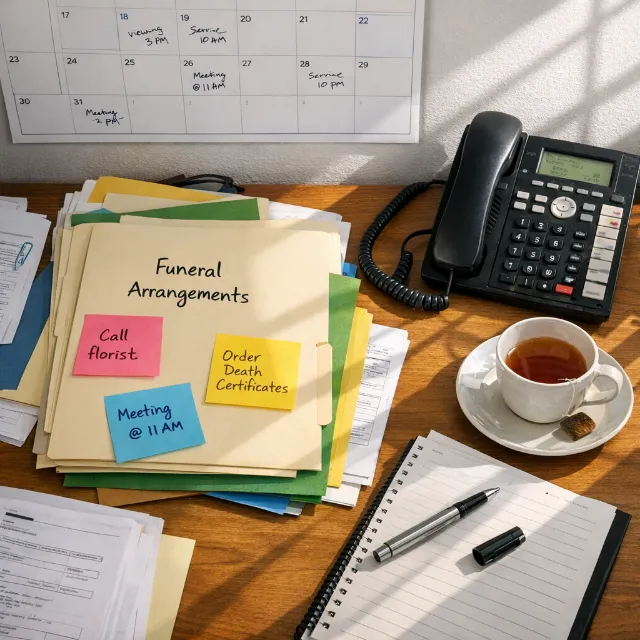

It’s Monday morning. Two new cases came in over the weekend. The night-call notes for one are on a Post-it stuck to the side of the office phone - first name, a mobile number, and something that might say “Baptist” or “Babtist” or possibly “Bassist.” The transfer form for the second case was started on a paper template in the back of the van, but the driver forgot to bring it in. He’s now on another collection and won’t be back until noon.
On Fiona’s desk - or somewhere on Fiona’s desk - there are three cremation authorisation forms waiting for a second medical certificate. She’s fairly sure Dr Malone was contacted about two of them last Thursday. She’s less sure about the third. There’s no note. Fiona is off today.
The phone rings. A family from last week wants to confirm their signed arrangement contract was received. It was - probably. Someone opens the filing cabinet, flicks through a dozen manila folders, pulls one out, checks the name, puts it back, pulls out another. Four minutes later: yes, it’s here. Signed. Filed. Found.
Meanwhile, the Kavanagh family’s invoice hasn’t gone out because the case file is still in the arranger’s tray, unsigned. The arranger was out Thursday and Friday for a funeral across the county. Nobody picked it up.
None of this is a crisis. Nothing has gone catastrophically wrong. No family has been let down - yet. But the morning is already half gone, and the actual work of arranging funerals, supporting families, coordinating services hasn’t started. The day’s first two hours have been consumed by searching, chasing, clarifying, and reconstructing information that should already be where it needs to be.
This is the paperwork black hole. And if you run a funeral home, you’ve lived some version of this Monday more times than you can count.
The Real Problem Is Outdated Infrastructure, Not Disorganisation
Here’s what nobody says often enough: funeral directors who work on paper aren’t disorganised. Most are remarkably organised, given what they’re working with. The folder systems, the desk trays, the colour-coded diaries, the whiteboard in the back office - these are coping mechanisms, built and refined over years, to manage complexity with tools that weren’t designed for the current volume.
The paper-based workflows most homes rely on were built for an era when a funeral home handled fewer cases per year, dealt with fewer regulatory requirements, and operated in a world where families expected less immediacy. A generation ago, a family would wait for an office appointment without complaint. A cremation form could sit on a desk for two days and nobody batted an eye.
That world is gone. Families expect same-day responses. Regulatory frameworks - the CMA Funerals Market Investigation Order, NAFD Quality Assured standards, the IAFD Quality Assurance framework - demand documentation that’s complete, accurate, and retrievable. Case volumes at many independent homes have grown even as staff counts haven’t. The NFDA’s most recent workforce surveys consistently show that directors are handling more cases with fewer qualified staff.
Key insight
The systems haven’t kept pace. What looks like a character flaw is really a tooling gap.
Wednesday: The Small Things That Eat the Hours
Back to our week. By Wednesday, the second doctor has signed two of the three cremation authorisation forms. Progress - except that one form has a discrepancy. The deceased’s middle name is spelled “Therese” on the medical certificate and “Theresa” on the original case file. Someone handwrote it differently at first call, and the error has cascaded. It needs correcting before the crematorium will accept it. Another phone call. Another form. Another signature.
The Walsh family wants to sign their arrangement contract but can’t get to the office until Saturday. Mrs Walsh works full-time and is caring for her mother’s estate on evenings and weekends. She’s asked twice whether she can “just do it online.” The answer, in this office, is no. So the contract waits. The invoice waits. The case sits open.
The weekend case - the Post-it note case - still doesn’t have complete paperwork. The informant hasn’t provided all the details needed for death registration, and nobody flagged the follow-up on Monday because there was no system to flag it in. It was in someone’s head. That someone got pulled into a viewing Tuesday afternoon and forgot.
Each of these is minor. A ten-minute phone call. A five-minute search. A form reprinted and re-signed. But by Thursday, these fragments have consumed hours of cumulative staff time across the team. Hours that could have been spent with families, or on arrangement meetings, or - frankly - going home at a reasonable time.
For a deeper look at where these breakdowns cluster, see First Call to Final Disposition: Where Your Workflow Actually Breaks Down.
What “Going Paperless” Actually Means (It’s Not Buying an iPad)
This is where most conversations about going paperless go wrong. Someone imagines scanning paper forms into a shared folder on a laptop and calls it digital transformation. It’s not. A scanned PDF in a folder is just a photograph of the same problem.
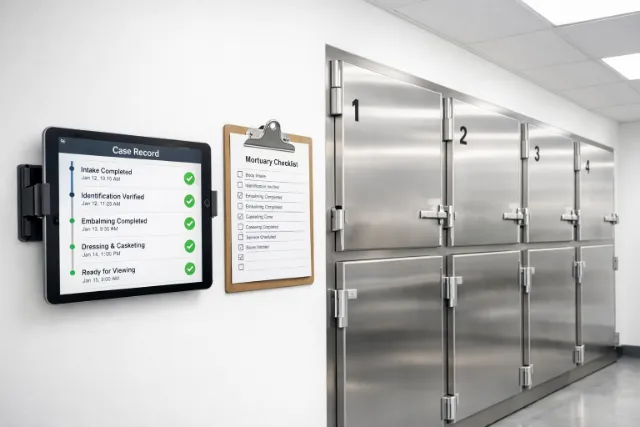
Going paperless - properly - means shifting the fundamental unit of work from a physical case file that lives in one location and can only be seen by whoever is standing next to it, to a digital case record that’s accessible to everyone who needs it, updated in real time, and structured so that missing information is visible rather than hidden.
In a paper system, the absence of information is invisible. A form that hasn’t been signed doesn’t shout from the filing cabinet.
That distinction matters more than any feature list. In a paper system, the absence of information is invisible. A form that hasn’t been signed doesn’t shout from the filing cabinet. A follow-up that hasn’t happened doesn’t announce itself from the desk tray. You only discover gaps when you go looking - or when a family calls, or a crematorium rejects a form, or an invoice is three weeks overdue.
In a properly digital workflow, here’s what changes:
First-call details are entered once, into the case, visible to the whole team immediately. Not transcribed from a notepad to a form to a folder. The on-call director enters it from their phone at 2am, and when the office opens at 9am, the case is already there - complete with the details that were gathered, and clearly showing the details that weren’t.
Documents go to families for signature electronically. Mrs Walsh signs the arrangement contract from her kitchen table on her phone. The signed document attaches to the case file automatically. No office visit. No waiting. No chasing.
Task checklists show what’s been done and what hasn’t, per case. The cremation form waiting for a second medical certificate shows up as an open task with a status - not a piece of paper on Fiona’s desk that depends on Fiona being in the office and remembering which doctor she called.
Every authorisation document, contract, and piece of correspondence is stored against the case - findable in seconds, not four minutes of filing cabinet archaeology.
For more on building an audit-ready record, see Chain of Custody: The Records Every Funeral Home Should Produce in Under 5 Minutes.
The Honest Objections (Because You’re Already Thinking Them)
If going digital is so obviously better, why hasn’t every funeral home done it? Because the objections are real, and pretending they aren’t helps nobody.
“It costs money.”
It does. But frame that against the hidden cost of paper: the hours your team spends searching, duplicating, chasing, and correcting every week. The Monday morning scenario at the top of this post isn’t abstract - it’s payroll spent on administrative friction rather than family care. Most homes that track it find the time cost of paper workflows is far higher than the subscription cost of a decent platform.
“My staff won’t use it.”
Some won’t want to - particularly experienced directors who’ve run on paper for thirty years and run well. That’s fair. The answer isn’t to overhaul everything on a Monday and expect buy-in by Friday. Start with one workflow. Document signing is a good entry point: it’s immediately useful, it reduces a visible frustration (chasing families for office visits), and it shows results within days. Let the sceptics see it work before you ask them to change anything else.
“What if the system goes down?”
A reasonable concern - and a less reasonable one than it sounds. Cloud-based platforms run on infrastructure with redundancy that no filing cabinet can match. Your paper files aren’t backed up. They’re not fireproof. They’re not floodproof. A server outage is temporary and recoverable. A fire in your records room is neither. Good platforms also work offline or cache locally for continuity.
“We don’t have time to switch - we’re already flat out.”
This is the most honest objection, and it deserves an honest answer: yes, there’s a learning curve. It takes real time to set up, configure, and train a team. But it’s weeks, not months. And the payoff begins with the first workflow you digitise - not after you’ve moved everything across. You don’t have to eat the elephant in one sitting.
Key insight
Start with one workflow. Let the sceptics see it work before you ask them to change anything else.
Weighing up systems?
We have put the five funeral software systems UK and Irish directors actually shortlist, Obit, Seker eFD, Eulogica, Funeral Manager and EverlyPro, side by side on eSignatures, payments, custody, mobile, pricing and migration. See the comparison.
Where a Platform Fits Into This
This is what platforms like EverlyPro are built to handle. Case details entered once at first call populate every downstream document. Families sign contracts and authorisation forms via a secure link on their phone - no office visit required. Task templates auto-load into every new case, so the cremation form that needs a second signature shows up as an open task with a clear owner, not a sheet of paper in a desk tray. Every document, note, and communication lives against the case record, visible to the whole team. The Monday morning scenario at the start of this post doesn’t disappear because directors become more organised - it disappears because the system makes disorganisation structurally difficult.
Coming soon
E-Signatures in Funeral Service: Legal Validity and Cutting Turnaround Time
Coming soon
GDPR and Digital Case Files: What Funeral Directors Need to Know
Note: For homes handling data digitally: GDPR applies to digital case records in the UK and Ireland. Any platform you use must support appropriate data handling, access controls, and retention policies.
Monday Morning, the Other Version
Same funeral home. Same weekend. Two cases came in.
The on-call director entered both into the system from their phone - one at 11pm Saturday, one at 6am Sunday. By the time the office opens Monday morning, the case records are there: names, contact details, first-call notes, preliminary requirements. The transfer paperwork for the second case was completed on a tablet in the van and is already attached to the file.
The three cremation authorisation forms? They’re showing as open tasks. Each one has a status: two are marked “second doctor contacted - awaiting signature,” one is flagged “doctor not yet contacted.” Nobody has to remember. Nobody has to check Fiona’s desk. It’s visible.
The family from last week who called about their contract? They signed it on Sunday evening from their kitchen table. It’s in the case file. Timestamped. Stored. If they call, the answer takes five seconds.
The Kavanagh invoice went out Friday, automatically generated from the completed case file the moment the arranger marked the arrangement as confirmed.
Same cases. Same families. Same volume. Same staff. A fundamentally different Monday.
That’s what going paperless actually looks like. Not a technology revolution. Not a gleaming digital future. Just a funeral home where the information is where it needs to be, when it needs to be there - and nobody spends their morning searching for a Post-it note.
Sources
- CMA Funerals Market Investigation Order 2021
- NFDA Workforce Survey Data
- NAFD Quality Assured Standards
- IAFD Quality Assurance Framework